Cashful: Personal finance tracker for iPhone, iPad, Mac and Apple Watch
Track income and expenses without the typing: say it or snap a receipt, and Cashful fills in the amount, category and account, then syncs to your iPad, Mac and Apple Watch. No bank login, no ads.

- Private by design
- No bank connection
- No ads
- 13 languages
Add an expense in seconds: voice, receipt or calculator
Logging is the part that makes or breaks a budget, so Cashful makes it quick. Try voice and receipts for free, and type as much as you like.
You say
Coffee and a croissant, 7.40, paid by card
Cashful fills in
- Amount
- -$7.40
- Category
- Food & Drinks
- Account
- Card
-
Voice input
10 freeTap the mic, say the expense, tap anywhere to finish. How the voice expense tracker works.
-
Receipt scan
5 freeSnap a receipt and the total, category, account and date fill in. Read about the receipt scanner.
-
Calculator keyboard
FreeAdd, subtract and split right in the amount field, and see the balance before and after.
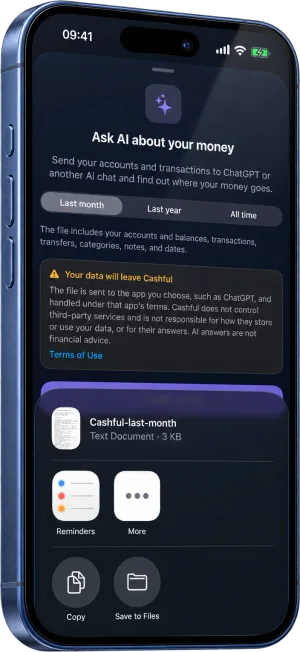
Ask ChatGPT where your money goes
Pick last month, last year or all time, and Cashful packs your accounts and transactions into one tidy file for ChatGPT or any other AI chat. Then just ask.
- Where did most of my money go last month?
- Which subscriptions could I cancel?
- How can I spend 10% less without pain?
Cashful never sends your data to an AI on its own. You share the file yourself from the iOS share sheet.
Expense tracking on iPhone, iPad, Mac and Apple Watch
One budget everywhere you are. Entries sync through your own iCloud, so an expense logged on your wrist is on your iPhone and iPad a moment later.
Apple Watch, free for everyone
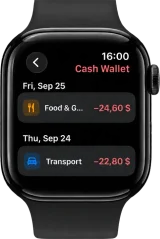
Speak an expense, dial it in with the Digital Crown or tap the keypad, pick a category and you're done. See the Apple Watch expense tracker guide.
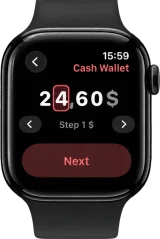 Amount
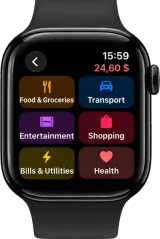 Category
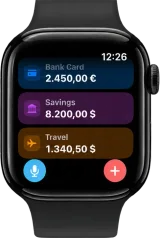 Accounts
 History
Room to think on iPad and Mac
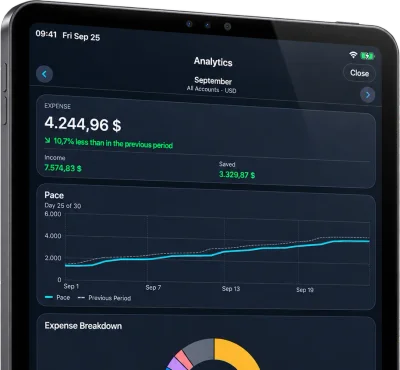
The same Cashful with space for charts, history and analytics side by side. On a Mac with Apple silicon, Cashful runs as the iPad app from the Mac App Store.
Widgets
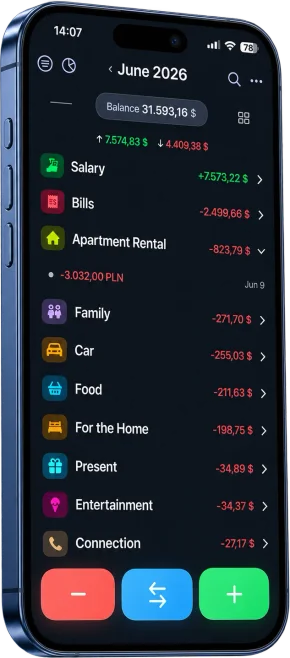
Balance and quick add on the Home Screen, Lock Screen and watch face.
Siri and Shortcuts
Say “Quick expense in Cashful” and one phrase. The expense is saved.
Back Tap
Double-tap the back of your iPhone to open a new expense. Set up Back Tap to add an expense.
Income and expense analytics, accounts in any currency
The monthly summary is free. Pro adds the deeper view, and every account can live in its own currency.
See where your money goes
Breakdowns, category ranking, cash flow, a heat map of the year and any two months side by side (Pro).
Accounts in any currency, with your own rates
Cards, cash, savings and travel money in any currency. Transfers convert with the rate you set, and both balances stay right.
Who Cashful is for
Couples and families
One shared budget in a shared Space through iCloud, instead of emailing spreadsheets around (Pro).
Travelers
Cash, cards and local money in separate accounts, converted as you go and reviewed by category at home.
Privacy-minded
No bank credentials, no account aggregation, no sign-up. Your records live on your devices and in your iCloud.
Freelancers and side projects
An account per income stream, CSV export at tax time and a clear view of what each project costs (Pro).
A budget app without bank connection
Cashful never asks for bank credentials and has no account to sign up for. Your records live on your devices and sync through Apple's iCloud in your own container.
- Bank login
- Never
- Ads and trackers
- None
- Where your records live
- Your devices and your iCloud
- Usage statistics
- Opt-in, anonymous
Free to start, Pro when you need more
Pro is one in-app subscription billed through your Apple ID, with a 7-day free trial on both plans. Cancel anytime in Settings. Prices shown for United States.
Free forever, 7-day Pro trial, no ads.
Cashful Free
Everything you need to track, day to day.
- 10 voice entries and 5 receipt scans
- Calculator keyboard
- Income, expenses and transfers
- Up to 3 accounts, 2 currencies
- Donut chart, search and full history
- iCloud sync, widgets, Siri and Apple Watch
- Subcategories on every category
Cashful Pro 7-day trial
The deeper view, with everything from Free.
- Everything in Free
- Full analytics, breakdowns and trends
- Compare any two months
- Heat map of the year
- Unlimited accounts and currencies
- Shared Spaces for family budgets
- CSV import and export
- Ask ChatGPT & AI about your spending
Compare Free and Pro
| Feature | Free | Pro |
|---|---|---|
| Voice input and receipt scan | 10 voice, 5 scans | Unlimited |
| Calculator keyboard | Included | Included |
| Apple Watch app | Included | Included |
| Income, expenses and transfers | Included | Included |
| Home donut, balance and search | Included | Included |
| iCloud sync (your container) | Included | Included |
| Widgets and Siri | Included | Included |
| Accounts | Up to 3 | Unlimited |
| Currencies | Up to 2 | Unlimited |
| Full analytics and trends | Not included | Breakdowns, ranking, cash-flow |
| Compare two months | Not included | Side by side |
| CSV import and export | Not included | Import & export |
| Shared Spaces (family budgets) | Not included | Family CloudKit sync |
| Ask ChatGPT & AI | Not included | Share with any AI chat |
Questions about Cashful
Is Cashful a personal finance app or just an expense tracker?
When is Cashful not the right finance app?
Is Cashful free?
Does Cashful connect to my bank account?
How do I add an expense by voice?
Can Cashful scan receipts?
Can I track expenses on Apple Watch?
Can I analyze my spending with ChatGPT?
Where is my data stored, and is it private?
Does Cashful work offline?
Can I track multiple currencies?
Can I share a budget with my partner or family?
Can I import or export my data to Excel or CSV?
Can I add expenses with Siri?
What does Cashful Pro cost and include?
How does the 7-day free trial work?
How do I cancel my subscription?
How do I restore purchases on a new iPhone?
Does Cashful work on Mac?
More answers on the support page.
Personal finance guides
How to track income and expenses
A simple system for keeping your personal finances in order.How to choose a finance tracker app for iPhone
The three kinds of trackers, 7 things to check and a five-minute setup.How to track expenses by voice on iPhone
Say it once, and the amount, category and account fill in.How to scan receipts into an expense tracker on iPhone
What gets read, what to check, and where the photo goes.How to track expenses on Apple Watch
Voice, Digital Crown or keypad, right at the checkout.How to analyze your spending with ChatGPT
Clean data, ready-to-copy prompts, and what leaves your phone.Why a budget app without bank linking is worth it
No bank login, no broken syncs, more awareness of spending.How to track expenses without a spreadsheet
Keep a budget going when spreadsheets stop working.

Your next expense takes five seconds.
Free to start. Pro unlocks the deeper view, only when you want it.
Get Cashful