How to analyze your spending with ChatGPT
Updated
An AI chat can turn months of expenses into a clear summary, as long as you give it clean data. Here is how to do that with Cashful, an expense tracker for iPhone, plus prompts you can copy and use right away.
What an AI chat can and can't tell you about your spending
ChatGPT and similar assistants are good at reading a table of transactions and describing it in plain words: which categories are the largest, what repeats every month, how one period compares with another. They can also help you draft a budget or put a spending goal into words.
They also have limits. An AI only sees the file you give it, it can misread or miscount, and it does not know your plans, obligations or circumstances. Treat the answer as a starting point for your own thinking, check any figure that matters against the app, and keep in mind that an AI answer is not financial advice.
Step 1: start with clean data
Most tutorials tell you to upload a bank statement. Bank exports are messy: merchant codes instead of names, card payments and transfers mixed together, no categories, one file per account. The AI spends its effort guessing what each line means.
If you track your spending in Cashful, the data is already clean. Every entry has a category you chose, an account and a date, and nothing depends on a bank feed, because Cashful is a budget app without linking your bank. The export is one plain text file with:
- your accounts, with their currency and current balance
- the transactions for the period: date and time, type (expense, income or transfer), amount, currency, account, category, subcategory and note
- for transfers, the destination account and the amount that arrived
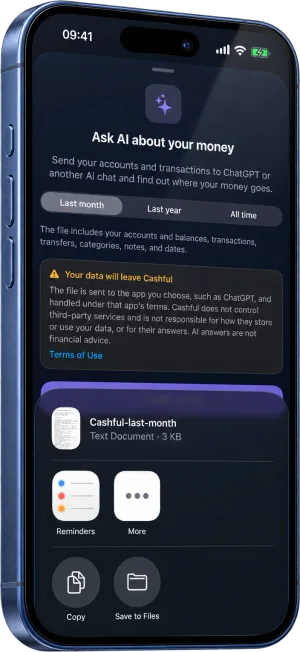
You choose the period: Last month, Last year or All time, counted back from today. Names are written out in full, so the AI can read the file without any explanation from you. Only your own space is exported, never the entries of people you share a space with.
Step 2: share the file with ChatGPT or any AI chat
- On the Cashful home screen, open the menu on the right and tap ChatGPT & AI, just below Analytics.
- Pick the period.
- Read the notice: once the file leaves Cashful, the app you choose handles it under its own terms. The notice links to our terms for third-party apps and AI services.
- Tap Share with AI and choose ChatGPT, or any other app you have in the share sheet, such as Claude, Gemini or Files.
Cashful adds a short starter request that asks where your money goes, which categories are the biggest and where you could save. If your chat app does not pick it up, paste one of the prompts below after the file.
Step 3: prompts that work
Copy a prompt, send it together with the file, and ask follow-up questions in the same chat. For month-to-month comparisons, export Last year or All time so the file covers both months.
Using the attached Cashful file, show where my money went: total spending by category, largest first, with each category's share of the total.
Find recurring costs and subscriptions in this file, meaning payments that repeat every week or every month. List each one with its usual amount and how often it appears.
Compare my spending in the most recent month with the month before, by category. Which categories went up or down the most?
I want to spend about 10% less next month without giving up what matters most to me. Based on this data, which categories have the most room, and what small changes would you suggest?
Compare my spending on weekdays with my spending on weekends. Which categories change the most on weekends?
Draft a simple monthly budget from this data, with a suggested limit for each expense category based on what I actually spent.
Example answer, built from demo data, not from a real person's spending:
- Total spending this month: $1,568.
- Top categories: Groceries $486 (31%), Dining out $312 (20%), Transport $174 (11%).
- Recurring: a streaming service at $15.99 and a gym membership at $39, both monthly.
- Dining out rose by $96 compared with last month, mostly on weekends.
Privacy: what leaves your phone
Cashful never sends your data to an AI on its own. The file is created on your iPhone only when you tap Share with AI, and it goes only to the app you pick in the share sheet. Cashful does not upload it or keep a copy on its servers.
A few habits keep you in control:
- Check your notes. Notes are included exactly as you wrote them. If a note holds something you would rather not share, edit it in Cashful before you export.
- Pick the shortest period that answers your question. Last month is often enough.
- Review your AI provider's data settings. Many chat services let you stop your chats from being used for training, or delete a conversation later. Those settings live in the AI app, not in Cashful.
Make it a monthly habit
One analysis is interesting. A monthly one is useful. At the start of each month, export Last month, send the same prompts and compare the answer with the one before. If you share the new file in the same chat, the AI can make that comparison for you.
When a category stands out, turn it into a concrete target, for example a lower limit for dining out next month. Then keep logging in Cashful as usual and check a month later whether that category moved. If you used to do this kind of review in a spreadsheet, see how to track expenses without a spreadsheet.
Questions
Does Cashful send my data to ChatGPT?
No. Cashful never sends your data to an AI on its own. The export file is created on your iPhone when you tap Share with AI, and it goes only to the app you choose in the share sheet. Cashful does not keep a copy on its servers.
Can I use Claude, Gemini or another AI chat instead?
Yes. The file is plain text, so any AI chat that accepts files can read it. Choose the app in the share sheet, or save the file to Files and upload it in the chat. The prompts on this page work the same way.
Is "Ask ChatGPT & AI" free?
It is part of Cashful Pro, and the 7-day free trial includes it. Logging expenses by hand stays free, without limits.

Get Cashful, log your spending in seconds and ask ChatGPT where your money goes whenever you want.
Get Cashful