Monefy alternative for iPhone: an honest comparison with Money Manager and Cashful
Updated
Looking for a Monefy alternative? If you only use an iPhone and like tapping in amounts, Monefy may still be the right app for you. If you want the same simple manual tracking on iPhone, iPad, Mac and Apple Watch, with expenses added from one spoken sentence or a receipt photo, Cashful, a money tracker for Apple devices, is built for that. Below is a fair look at Monefy and at Money Manager by Realbyte, a side-by-side table, and how to switch without losing your footing.
What Monefy and Money Manager do well
Both are popular, well-rated manual expense trackers, and both are actively maintained: Monefy was last updated in August 2026, Money Manager in September 2026. Monefy states that no bank login is required.
- Monefy is built for speed: tap a category, type the amount, done, and a pie chart shows where the month went. The core app is free, its help center says it contains zero ad SDKs, and there is no account to create. Your data stays in an encrypted file on the phone unless you turn on sync to your own Google Drive or Dropbox. It handles more than 150 currencies, budgets and recurring records, runs on Android as well, and holds 4.72 stars from 6,711 ratings in the US App Store.
- Money Manager by Realbyte is the more detailed of the two: automatic double-entry bookkeeping, weekly, monthly and annual budgets, a calendar view and credit card settlement tracking. It runs on iPhone, iPad and Android, and the ad-free version is a one-time purchase rather than a subscription. It holds 4.82 stars from 19,406 ratings in the US App Store.
If either app already fits your routine, there is no reason to switch. The points below only matter if one of them is exactly what you are missing.
Why people look for a Monefy alternative
- More Apple devices. On Apple platforms Monefy is iPhone-only: there is no iPad, Mac or Apple Watch app. Money Manager adds iPad, but has no Mac or Apple Watch app either. If you want to log a purchase from your wrist at the checkout, or review the month on a bigger screen, neither covers it.
- Entry without typing. Some people would rather say an expense out loud or photograph the receipt than type it. Money Manager lets you attach up to three photos to a record, but its help center does not describe reading a receipt into an entry.
- No ads in the free version. Money Manager's free app carries the App Store "Contains Advertising" label, and its privacy label lists usage data used to track you. The ads go away in the paid app. Monefy, to be fair, shows no ads.
- Sync with nothing to set up. Monefy syncs through your own Google Drive or Dropbox. That keeps your file off Monefy's servers, but you need one of those accounts and have to connect it. Many iPhone owners would rather have records sync through iCloud on their own.
Monefy vs Money Manager vs Cashful
Facts as of October 2026, taken from each developer's website, help center and US App Store listing. Prices are US prices; they differ in other countries.
| Monefy | Money Manager | Cashful | |
|---|---|---|---|
| Apple devices | iPhone only | iPhone, iPad | iPhone, iPad, Mac with Apple silicon (the iPad app), Apple Watch |
| Android | Yes | Yes | No, Apple only |
| How entries get in | Typed: one tap on a category, then the amount | Typed, with double-entry bookkeeping | A spoken sentence, a receipt photo or the calculator keyboard |
| Free version | Core app free; Premium adds unlimited accounts, recurring transactions and advanced filters | Free with ads, up to 10 accounts | No time limit: unlimited entries, 3 accounts, 2 currencies, 10 voice entries and 5 receipt scans to try |
| Ads in the free version | No | Yes | No |
| Paid option | Premium; price shown in the app | Ad-free app, $5.99 one-time | Pro $2.99 a month or $29.99 a year, 7-day free trial |
| Currencies | 150+, exchange rates set by you | Several, exchange rates set by you | 2 free, unlimited in Pro, your own exchange rates |
| US App Store rating | 4.72 (6,711 ratings) | 4.82 (19,406 ratings) | Not enough ratings yet |
Cashful's own angle is how an expense gets in. Say "coffee 4.50 card" and the amount, category and account fill in for you to check; snap a receipt and the same happens. The spoken text and the receipt photo are read by an AI model on Cashful's server and are not stored there. Everything else stays on your devices and in your own iCloud, with no sign-up and no bank connection.
Monefy and Money Manager are trademarks of their respective owners. Cashful is not affiliated with Reflective Technologies or Realbyte.
Who should stay with Monefy or Money Manager
- You use Android, or switch between Android and iPhone. Both apps run on Android; Cashful is Apple-only.
- You keep one budget with a partner who also logs expenses. Monefy offers sharing with a partner through its Google Drive or Dropbox sync. In Cashful's shared Spaces (Pro), the people you invite can view the budget, but only the owner adds and edits entries.
- You want double-entry bookkeeping, a calendar view or credit card settlement tracking. That is Money Manager's strength.
- You prefer paying once over a subscription. Money Manager's ad-free app is a one-time $5.99 in the US.
- You only use an iPhone, and one tap plus an amount already feels fast enough.
Who Cashful suits as a Monefy alternative
- You use more than an iPhone. Cashful runs on iPhone, iPad, Mac with Apple silicon and Apple Watch, and your records sync through your own iCloud.
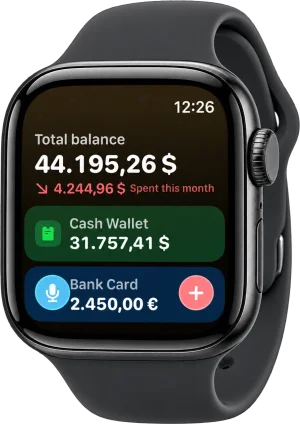
- You want to log at the checkout. The free Apple Watch app takes an expense by voice, Digital Crown or keypad, and has watch-face widgets.
- Typing every expense is what makes you quit. Voice entry and receipt scanning fill in the amount, category and account; the calculator keyboard is there when you prefer to type.
- You want no ads, no sign-up and no bank connection, with a free plan that has no time limit.
- You track money in several currencies, with your own exchange rates and transfers between accounts.
Still weighing what matters most in a tracker? Our guide on how to choose a money tracker app for iPhone has a 7-point checklist that works for any app, not only Cashful.
How to switch from Monefy to Cashful
- Install Cashful from the App Store and keep your old app for now.
- Add the accounts you actually pay from, such as cash and a card, each with its currency and current balance. Starting from today's balances is the quickest way to switch.
- If you want your history too: Cashful Pro can import a CSV file. Check whether your current app can export your records as CSV, then import that file into Cashful.
- Put a Cashful widget on your Home Screen, set up Siri or install the Apple Watch app, so a new entry is always one move away.
- Log every expense in Cashful for a week or two. Once the new routine feels natural, retire the old app.
Coming from a budgeting app rather than a simple tracker? Read our YNAB alternative guide instead.
Questions
What is a good Monefy alternative for iPhone?
If you want the same quick manual tracking on more Apple devices, Cashful is one option: it runs on iPhone, iPad, Mac with Apple silicon and Apple Watch, adds an expense from a spoken sentence or a receipt photo, shows no ads and never connects to your bank. Money Manager by Realbyte is another manual tracker, with double-entry bookkeeping, on iPhone, iPad and Android.
Is Monefy free?
Monefy says its core app is completely free. Monefy Premium unlocks unlimited accounts, recurring transactions, advanced filters and more. For comparison, Cashful's free plan has no time limit and includes unlimited manual entries, up to 3 accounts and 2 currencies.
Monefy or Money Manager: which is better?
Monefy is quicker and simpler: one tap and an amount. Money Manager is more detailed, with double-entry bookkeeping, a calendar view and credit card tracking, but its free version shows ads. Neither has a Mac or Apple Watch app; if you need those, look at Cashful.
Can I move my data from Monefy to Cashful?
Cashful Pro can import records from a CSV file. If your current app can export your records as CSV, export them and import the file into Cashful. You can also start fresh with your current account balances, which takes a few minutes.
Does Cashful work on Android?
No. Cashful is Apple-only: iPhone, iPad, Mac with Apple silicon and Apple Watch. If you use Android, Monefy and Money Manager both have Android apps.

Get Cashful, the Monefy alternative for iPhone, iPad, Mac and Apple Watch: say an expense or snap a receipt, with no ads and no bank login.
Get Cashful