Best budget app for iPhone: 7 finance tracker apps compared
Updated
The best budget app for iPhone is the one you still open a month from now, and that depends on how you want entries to get in. If you want your bank to fill it in, YNAB, Spendee and Zenmoney import transactions. If you want a free, simple manual tracker, Monefy is hard to beat. If you want manual tracking that takes seconds, by voice or receipt photo, on iPhone, Mac and Apple Watch, with no bank link and no ads, that is what Cashful, our money tracker app, is built for. Below: a side-by-side table, who each app suits, a 7-point checklist and a five-minute setup.
Best budget apps for iPhone compared
We make Cashful, so this table sticks to what each developer publishes on its own website, help center and App Store listing. Where a developer does not mention a feature, we leave the cell empty rather than guess.
| App | Devices | Price | Bank sync | Voice or receipt entry | Apple Watch | Ads in free version |
|---|---|---|---|---|---|---|
| Cashful | iPhone, iPad, Mac with Apple silicon, Apple Watch | Free plan with no time limit; Pro $2.99/month or $29.99/year, 7-day trial | No, manual by design | Both: one spoken sentence or a receipt photo (10 voice entries and 5 scans free, unlimited in Pro) | Yes, free | No |
| YNAB | iPhone, iPad, Apple Watch, Android, web; no Mac app | No free plan; 34-day trial, then $14.99/month or $109/year | Yes, select US, Canadian, UK and EU banks | Voice through a Siri shortcut | Yes | No free version |
| Monefy | iPhone and Android; no iPad, Mac or Watch app | Free core app; paid Premium | No; statements can be imported by hand | — | No | No |
| Money Manager (Realbyte) | iPhone, iPad, Android | Free with ads; ad-free version $5.99 one-time | — | No receipt reading; photos can be attached | No | Yes |
| Spendee | iPhone, Android, web | Free basic plan (1 cash wallet, 1 budget); Premium $5.99/month or $35.99/year | Yes, in Premium: 2,500+ providers worldwide | Receipt photo scan in Premium | No | No |
| Zenmoney | iPhone, Android | Free basic version; full version $3.49/month or $19.99/year | Yes, 3,300+ banks worldwide | QR code on Russian receipts (full version) | No | No |
| CoinKeeper 3 | iPhone, Android, web (paid) | Free plan (up to 10 categories); paid Platinum and Platinum PLUS | Yes, Russian banks only | Voice through the AI assistant (Platinum PLUS) | No | Ad removal listed as a Platinum PLUS feature |
Facts as of October 2026, from each developer's website, help center and US App Store listing. Prices are US prices and differ by country. — means the developer does not mention it. Swipe the table sideways on a phone.
Who each finance app suits
- Cashful suits you if you live on Apple devices and want to log an expense in a few seconds by voice or receipt photo, including from your wrist, with no bank link, no ads and no sign-up. It is a young app, first released in February 2026, so it has few reviews yet. It is not for you if you want bank import, use Android or track investments.
- YNAB suits you if you want a strict budgeting method where every dollar gets a job, your bank is supported, and you are happy to pay the highest price here. The app is English-only and keeps one currency per plan. If you like the idea but want faster manual entry, see our YNAB alternative for iPhone.
- Monefy suits you if you want the simplest free tap-and-done tracker on iPhone and Android, synced through your own Google Drive or Dropbox. On Apple devices it is iPhone-only. Compare it with a Monefy alternative that has voice entry and an Apple Watch app.
- Money Manager suits bookkeeping-minded people: it uses double-entry bookkeeping, a calendar view and credit card settlement tracking. The free app shows ads; a one-time purchase removes them.
- Spendee suits couples who want shared wallets (Plus and Premium) and a web app, with bank sync in Premium. You sign up with an email or social account on first launch.
- Zenmoney suits you if you want automatic import from many banks with AI categorisation and a family account. It needs registration. If you would rather keep your bank out of it, read about a Zenmoney alternative without bank connection.
- CoinKeeper 3 suits people who bank in Russia and want imports from Russian banks, category limits and goals. Outside Russia its bank import does not help.
What a finance tracker app does, and the three kinds
A finance tracker app records what you earn and spend, groups it into categories and accounts, and shows where your money goes over a week, a month or a year. The real difference between apps is how each entry gets in:
| Kind | How entries get in | Trade-off |
|---|---|---|
| Bank-sync apps | Imported from your bank after you share your bank login | No typing, but you hand over bank access, imports can be late or wrong, and you rarely look at what you spent |
| Spreadsheets | Typed into rows by hand | Full control, but slow on a phone, and charts and categories are up to you |
| Manual money tracker apps | Added by you in the app, ideally in a few seconds | You notice every expense and nothing depends on your bank, but entry has to be fast or the habit breaks |
Cashful is the third kind, built to make manual entry quick. If you are unsure about skipping the bank link, read why a budget app without bank linking is worth it.
7 things to check before you pick a money tracker app for iPhone
- Speed of entry. Time how long one expense takes. Anything over a few seconds gets skipped on a busy day.
- Privacy. Does the app need your bank login or an account with your email? Does it show ads? Read the App Store privacy label.
- Accounts and currencies. Cash, cards and savings should be separate accounts, and travellers need several currencies and transfers.
- Devices. An expense is easiest to log where it happens: on your phone, on your wrist at the checkout, or on a bigger screen at the end of the month.
- Analytics you will read. A monthly summary by category answers most questions; trends help after a few months.
- Your data stays yours. Look for CSV export, so you can leave at any time, and import, so you can bring your history.
- A fair free plan. You should be able to track everyday spending for free, with no time limit, before paying for extras.
How Cashful answers the checklist
- Speed: say "coffee 4.50 card" or photograph a receipt, and Cashful fills in the amount, category and account for you to check. A calculator keyboard, widgets, Siri, the Action button and Back Tap cover the rest.
- Privacy: no bank connection, no ads, no sign-up. Records sync through your own iCloud; voice text and receipt photos are read by an AI model on Cashful's server and are not stored.
- Accounts and devices: each account has its own currency and exchange rate, and Cashful runs on iPhone, iPad, Mac with Apple silicon and a free Apple Watch app.
- Analytics and data: the monthly summary is free. Pro adds category ranking, cash flow, month comparison, a year heat map, CSV import and export, and the option to ask ChatGPT where your money goes.
- Free plan: unlimited manual entries, up to 3 accounts and 2 currencies, iCloud sync, widgets, Siri and the Apple Watch app, with no time limit.
Where Cashful is not the right fit: if you want transactions imported from your bank automatically, if you use Android or Windows, or if you need to track investments.
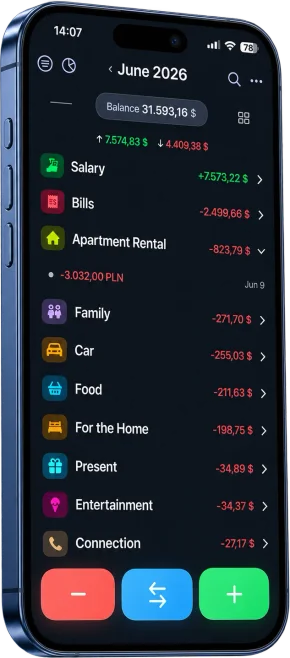
Set up a finance tracker on iPhone in five minutes
- Install Cashful from the App Store on your iPhone.
- Add the accounts you actually pay from, such as cash, a debit card and savings, each with its currency and current balance.
- Rename or remove the categories you will never use. Fewer categories make the monthly summary easier to read.
- Put a Cashful widget on your Home Screen, or set up Siri or Back Tap, so a new entry is always one move away.
- For the next week, log each expense right when it happens. Say it out loud or snap the receipt.
- At the end of the week, open the summary and look at your top three categories. That is usually where the first saving is.
Review for two minutes once a week rather than an hour once a month, and don't chase perfection: a missed coffee does not ruin the picture, giving up does. For the method behind it, read how to track income and expenses. To make logging even faster, see how to track expenses by voice on iPhone.
Questions
What is the best budget app for iPhone?
There is no single winner; it depends on how you want entries to get in. As of October 2026, YNAB is the best-known choice for a strict budgeting method with bank import, at $14.99 a month. Monefy is the simplest free manual tracker. Cashful suits people who want manual tracking that takes seconds, by voice or receipt photo, on iPhone, iPad, Mac and Apple Watch, with no bank link and no ads.
Which finance apps for iPhone are free and have no ads?
As of October 2026, Cashful, Monefy, Zenmoney and Spendee have free versions without ads. Money Manager's free app shows ads, which a $5.99 one-time paid version removes, and CoinKeeper lists ad removal as a Platinum PLUS feature. YNAB has no free plan, only a trial.
Which budget apps connect to your bank?
YNAB imports from select US, Canadian, UK and EU banks, Spendee Premium from more than 2,500 providers, Zenmoney from more than 3,300 banks, and CoinKeeper only from Russian banks. Cashful and Monefy never connect to a bank: you add entries yourself, so no bank login goes into the app and you notice every expense.
Which money tracker works on iPhone, Mac and Apple Watch?
Of the seven apps compared here, only Cashful covers iPhone, iPad, Mac with Apple silicon and Apple Watch, with records synced through your own iCloud. YNAB has iPhone, iPad, Apple Watch and web apps but no Mac app. Money Manager runs on iPhone and iPad, while Monefy, Spendee, Zenmoney and CoinKeeper 3 are made for iPhone only.
Which expense app lets me add spending by voice or a receipt photo?
In Cashful you say one sentence such as "coffee 4.50 card" or photograph a receipt, and the amount, category and account fill in; the free plan includes 10 voice entries and 5 receipt scans, and Pro makes them unlimited. Spendee Premium scans receipt photos, Zenmoney reads the QR code on Russian receipts, CoinKeeper's Platinum PLUS assistant adds operations by voice, and YNAB offers a Siri shortcut.

Get Cashful, the money tracker that fills in an expense from one spoken sentence or a receipt photo.
Get Cashful