How to track income and expenses: a simple system for your personal finances
Updated
To track income and expenses, write down every amount that comes in or goes out, sort it into a handful of categories, and look at the totals once a week. That is the whole system. The tool matters far less than the habit: a notebook, a spreadsheet and an app all work if you use them every day. This guide walks through each step, from choosing a method to running a family budget, so you can keep track of your personal finances without turning it into a second job.
Step 1: choose how you will track income and expenses
There are three ways to record money, plus a fourth if you let your bank do the typing. Pick the one you will actually open every day, not the one that looks most impressive.
| Method | Good for | Watch out for |
|---|---|---|
| Notebook | Trying tracking for a month with zero setup. Writing by hand makes every purchase feel real. | No totals or charts unless you add them up yourself, and the notebook is rarely with you at the checkout. |
| Spreadsheet | People who like building their own formulas and reviewing at a desk. | Slow to fill in on a phone, so entries pile up and get forgotten. Categories and charts are yours to maintain. |
| Manual tracking app | Logging each expense on the spot in a few seconds, with totals and charts done for you. | You still enter every amount, so the app has to make entry fast or the habit fades. |
| App with bank sync | People with many card transactions who mainly want automatic history. | You share bank access, imports can lag or miscategorize, and you rarely look at what you spent. |
If you have never tracked before, a manual method is the better teacher: noticing each purchase is what changes spending. If a spreadsheet already failed you, read how to track expenses without a spreadsheet. If you decide on an app, our guide on how to choose a money tracker app for iPhone lists what to check first.
Step 2: set up accounts and categories that work
Accounts are where your money lives: cash, a debit card, a credit card, a savings account. Write down the current balance of each one before you start. Moving money between them, for example from checking to savings, is a transfer, not an expense, so record it separately or your spending will look higher than it is.
Categories answer the question you actually care about: where does the money go? Start with 8 to 12. Fewer, broader categories make the monthly totals easy to read. A set that fits most households:
- Housing: rent or mortgage, utilities, internet
- Groceries
- Eating out and coffee
- Transport: fuel, public transport, taxis, parking
- Health: pharmacy, doctors, gym
- Subscriptions and phone
- Shopping: clothes, household items, electronics
- Fun: hobbies, cinema, travel
- Kids and pets
- Gifts and donations
- Other
For income, three categories are usually enough: salary, side income and other. Two rules keep categories useful. Split by decision, not by store: a supermarket trip for snacks and wine is groceries plus fun, if that is what you want to see. And if "Other" grows past about a tenth of your spending, give its biggest item its own category.
Step 3: pick a simple budgeting framework
For the first month, just track. Don't set limits yet, because you need real numbers before you can plan with them. Once you know where the money goes, choose one framework you can explain in a sentence. These are options, not rules:
- The 50/30/20 rule. Split take-home pay into 50% for needs (housing, groceries, bills, transport), 30% for wants (eating out, hobbies, shopping) and 20% for savings and paying off debt. On $3,000 a month that is $1,500, $900 and $600. In an expensive city, needs often take more than half; a 60/20/20 split is still a plan.
- Pay yourself first. On payday, move a fixed amount, say 10%, to savings before you spend anything. Whatever is left is yours to spend without guilt. Simple and hard to break.
- Envelopes. Give a few flexible categories such as groceries, eating out and fun a fixed monthly amount. When an envelope is empty, that category is done for the month. It works with real cash or with numbers in your notes.
- Zero-based budget. Assign every unit of income a job before the month begins until nothing is left unassigned. The most control, and the most effort.
Whatever you choose, plan for irregular costs too: insurance, car repairs, holidays, annual subscriptions. Add up a year of them, divide by 12, and set that amount aside every month so they stop feeling like emergencies.
Step 4: decide how often to review your finances
Tracking without looking is just bookkeeping. A short, regular review is where the savings come from:
- Every day, a few seconds: record each expense when it happens. Memory at the end of the day misses the small things, and small things add up.
- Every week, about 10 minutes: check that nothing is missing, fix wrong categories and glance at the biggest ones. This is when you can still change something this month.
- Every month, about 30 minutes: compare income with expenses, see how much you saved, compare categories with last month, and pick one thing to adjust next month.
- Once a year: look at the whole year, update your list of irregular costs and set a savings goal.
A useful monthly number is your savings rate: income minus expenses, divided by income. If it goes up from month to month, the system is working, whatever the individual categories say.
How to keep the habit of tracking money
Most people stop tracking in the first few weeks, and the reason is almost always friction, not willpower. A few things help:
- Log immediately. Record the purchase while you are still at the checkout or in the café.
- Make entry take seconds. Keep the tool one tap away: a widget, a shortcut, a pen in your wallet. The slower the entry, the sooner you stop.
- Don't chase perfection. Round amounts. A forgotten coffee does not ruin the picture; quitting does.
- Catch up once a week. If you missed something, check your card statement during the weekly review instead of giving up.
- Attach the review to a routine you already have, such as Sunday breakfast or the day after payday.
- Change one thing at a time. One adjustment per month sticks better than ten resolutions.
How to manage a family budget
A family budget works the same way, with one extra step: agreeing on the rules before the numbers. Things that help couples and families:
- Choose a model. Fully joint money, fully separate money, or "yours, mine and ours": a shared pot for rent, groceries and bills, with each partner contributing an agreed amount or a share proportional to income, and the rest kept personal.
- Decide who records what. One person can keep the records for the household, or each partner logs their own spending in shared categories. Both work as long as it is clear.
- Hold a monthly money talk. Twenty minutes with the totals in front of you: what went well, what surprised you, what to change. Talk about numbers, not blame.
- Keep personal allowances. A fixed amount each person spends without explaining avoids most arguments about small purchases.
- Set one shared goal. A holiday, an emergency fund, a deposit. A goal makes the tracking feel like progress, not control.
- Involve the kids. Pocket money with a simple record of what it was spent on teaches more than any lecture.
Tracking personal finances with Cashful
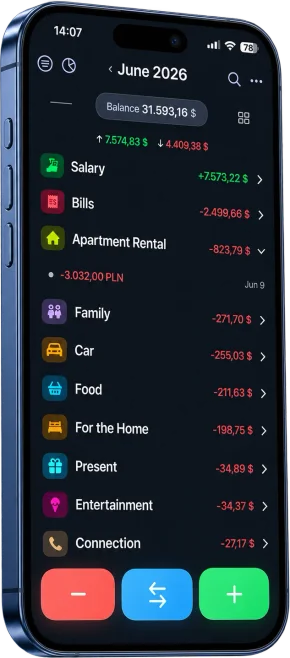
If you choose an app, Cashful is one convenient way to follow the steps above on iPhone, iPad, Mac and Apple Watch. It is a manual tracker built to make each entry quick: say "groceries 54 card" or snap a receipt, and Cashful fills in the amount, category and account for you to confirm. If you prefer typing, there is a calculator keyboard.
- Accounts, categories and transfers: income, expenses and transfers between accounts, each account in its own currency.
- Quick entry: Home Screen and Lock Screen widgets, Siri, the Action button, Back Tap and a free Apple Watch app.
- Privacy: no bank connection, no ads and no sign-up. Records stay on your devices and sync through your own iCloud.
- Free plan with no time limit: unlimited manual entries, income, expenses and transfers, up to 3 accounts and 2 currencies, iCloud sync, widgets, Siri and the Apple Watch app, plus 10 voice entries and 5 receipt scans to try.
- Cashful Pro: unlimited voice and receipt entry, full analytics with category ranking, cash flow and month comparison, CSV import and export, and shared Spaces where family members can see one budget (invitees have read-only access, and the owner adds entries). In the US it costs $2.99 a month or $29.99 a year, with a 7-day free trial.
When Cashful is not the right fit: if you want transactions imported from your bank automatically, if you use Android or Windows, or if you need to track investments.
Questions
What is the easiest way to track income and expenses?
Record each amount the moment it happens in whatever tool is always with you, use 8 to 12 broad categories, and review the totals for 10 minutes once a week. For most people that tool is the phone, either a notes app or a money tracker with quick entry such as Cashful, where you can log an expense by voice or receipt photo.
How many budget categories should I have?
Start with 8 to 12 expense categories and about 3 income categories. Fewer categories make the monthly summary easy to read and entry faster. Split a category only when you want to make a decision about it, and give an item its own category if "Other" grows past about a tenth of your spending.
Does the 50/30/20 rule work for everyone?
It is a starting point, not a law. It splits take-home pay into 50% needs, 30% wants and 20% savings and debt repayment. If housing is expensive where you live, needs may take more than half, and a 60/20/20 split can be realistic. Track for a month first, then set percentages that match your real numbers.
How should a couple keep a family budget?
Agree on a model first: joint money, separate money, or a shared pot for common bills with personal money on top. Decide who records what, use the same categories, and review the totals together once a month. Personal allowances and one shared goal help avoid arguments. In Cashful Pro, shared Spaces let family members see one budget, with invitees having read-only access.
Can I track my personal finances for free?
Yes. A notebook or a spreadsheet costs nothing, and many apps have free plans. Cashful's free plan has no time limit and includes unlimited manual entries, income, expenses and transfers, up to 3 accounts and 2 currencies, iCloud sync, widgets, Siri and the Apple Watch app. Cashful Pro adds unlimited voice and receipt entry, full analytics and shared Spaces.

Download Cashful and track income and expenses in seconds, by voice, receipt photo or calculator keyboard.
Get Cashful