Zenmoney and CoinKeeper alternatives for iPhone: an honest comparison
Updated
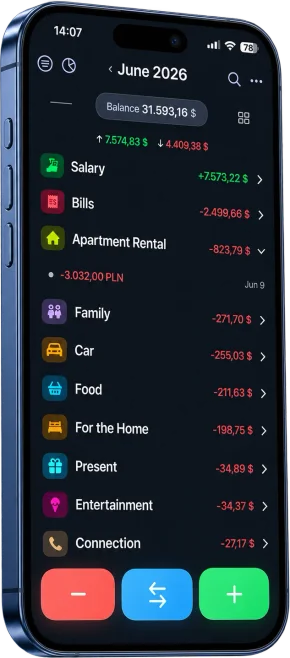
If you want a Zenmoney or CoinKeeper alternative for iPhone, start with one question: do you need transactions imported from your bank automatically? If yes, Zenmoney is hard to beat, because it connects to thousands of banks. If you are happy to log spending yourself, as long as it takes seconds and needs no sign-up and no bank access, look at Cashful, a money tracker for iPhone, iPad, Mac and Apple Watch. Below: what both apps do well, where they fall short, and how to switch.
What Zenmoney and CoinKeeper do well
Both are long-running personal finance apps, popular mostly with Russian-speaking users, and both shipped updates in September 2026.
- Zenmoney is built around automation: connections to more than 3,300 banks worldwide (European banks through GoCardless), bank SMS parsing, AI categorization, budget planning, a bill calendar and forecasts. A family account lets several people use their own logins with personal and shared accounts on one subscription. The free version has no ads.
- CoinKeeper is known for visual expense tracking with category limits and goals. Its free plan has no time limit and includes unlimited accounts and currencies, reports, search and category budgets. Paid tiers add bank import, voice entry through an AI assistant and family accounting for up to 5 people. It also runs on Android and the web.
If that is exactly what you need, there is no reason to switch.
Why people look for a Zenmoney alternative
- Bank access. The main strength of both apps, bank import, means connecting a bank account or letting the app read bank SMS. Zenmoney is also a cloud service that needs an account. If you would rather not, read why a budget app without bank linking is worth it.
- Regional limits. CoinKeeper imports only from Russian banks. Zenmoney covers banks in many countries, but bank import, reports and budgeting are part of its paid full version.
- iPad and Apple Watch. On the App Store both apps are iPhone-only, and neither current version has an Apple Watch app. Zenmoney's old web version is no longer supported.
- Free plan limits. CoinKeeper's free plan is capped at 10 categories and one income source, and its pricing table lists ad removal as a Platinum PLUS feature. Free Zenmoney has no reports or budgets.
- Faster manual entry. Zenmoney's scanner reads the QR code on Russian fiscal receipts, and CoinKeeper's voice entry is limited to its top Platinum PLUS tier.
Zenmoney vs CoinKeeper vs Cashful
| Zenmoney | CoinKeeper 3 | Cashful | |
|---|---|---|---|
| How entries arrive | Bank import, SMS and manual entry | Manual; bank import, SMS and PDF statements on Platinum | Manual only: voice, receipt photo or calculator keyboard |
| Banks | 3,300+ banks worldwide (full version) | Russian banks only (Platinum) | Never connects to a bank |
| Recognition | QR code on Russian fiscal receipts (full version) | Bank app screenshots and PDF statements, voice entry through the AI assistant (Platinum PLUS) | Any receipt photo and a spoken sentence: 5 scans and 10 voice entries free, unlimited in Pro |
| Free plan | Manual entry, no ads; reports and budgets are paid | No time limit: unlimited accounts and currencies, up to 10 categories, 1 income source | No time limit: unlimited manual entries, up to 3 accounts and 2 currencies, iCloud sync, widgets, Siri, Apple Watch |
| Paid plan (US App Store) | $3.49/month or $19.99/year, 1-week trial after sign-up | Platinum and Platinum PLUS tiers; prices vary by store | Pro $2.99/month or $29.99/year, 7-day free trial |
| Ads | None | Ad removal listed as a Platinum PLUS feature | None |
| Devices | iPhone, Android | iPhone, Android, web | iPhone, iPad, Mac with Apple silicon, Apple Watch |
| Shared budget | Family account, each person logs in | Family accounting for up to 5 (Platinum PLUS) | Pro shared Spaces; invitees get read-only access |
| App languages | 9, including Russian and Ukrainian | English, German, Polish, Portuguese, Russian, Spanish | 13, including English, Russian and Ukrainian |
As of October 2026, from the App Store and the developers' websites; prices and features change. Zenmoney and CoinKeeper are trademarks of their owners; Cashful is not affiliated with them.
When to stay with Zenmoney or CoinKeeper
- You want bank import. Cashful is manual by design: you add every entry yourself.
- You use Android or want a web app. Cashful is Apple-only, while Zenmoney and CoinKeeper run on Android and CoinKeeper also on the web.
- Several people add entries to one budget. In Cashful, invitees see a shared Space, but only the owner adds and edits entries.
- You track investments. Zenmoney mentions investments and crypto, CoinKeeper offers investments on Platinum PLUS. Cashful does not.
Who Cashful suits as a Zenmoney or CoinKeeper alternative
Cashful is a manual money tracker where one entry takes seconds. It suits you if this sounds right:
- No bank, no sign-up, no ads. Records stay on your devices and in your own iCloud. Voice text and receipt photos are sent to Cashful's server to be read by an AI model and are not stored.
- Seconds per entry. Say "coffee 4.50 card" or snap any receipt, and Cashful fills in the amount, category and account. Widgets, Siri and Back Tap open a new entry in one move.
- Every Apple device. iPhone, iPad, Mac with Apple silicon and a free Apple Watch app for logging at the checkout.
- Several currencies. Each account has its own currency, with your own exchange rates and transfers between accounts.
- A free plan with no time limit. Unlimited manual entries, income, expenses and transfers, up to 3 accounts and 2 currencies, iCloud sync, widgets, Siri and Apple Watch, plus 10 voice entries and 5 receipt scans to try. Cashful Pro removes the limits and adds full analytics, CSV import and export and shared Spaces.
For a wider look, read how to choose a money tracker app for iPhone.
How to switch to Cashful
- Decide whether you need your history. Often it is enough to start fresh with your current balances, which is free and takes a couple of minutes.
- If you do, prepare a CSV file. Export your transactions to CSV, if your current app allows it. CSV import is part of Cashful Pro, so you can test your file during the 7-day free trial.
- Create the same accounts. Cash, cards and savings, each with its currency and current balance.
- Trim your categories. Keep only the ones you actually use, so the monthly summary stays easy to read.
- Make entry quick. Add a Cashful widget or set up Siri so a new expense is always one move away.
- Run both apps for a week or two if you are unsure, and compare the totals.
New to tracking? Read how to track your income and expenses. We also compare Cashful with YNAB and Monefy.
Questions
What is a good Zenmoney alternative for iPhone?
It depends on why you use Zenmoney. If bank import is the point, stay with it. If you are happy to log spending yourself, Cashful adds an expense from one spoken sentence or a receipt photo, runs on iPhone, iPad, Mac and Apple Watch, needs no sign-up and never connects to your bank.
Zenmoney or CoinKeeper: which is better?
Zenmoney is stronger on automation, with bank import from more than 3,300 banks worldwide, budgets and forecasts. CoinKeeper suits tracking with category limits, and its free plan has unlimited accounts and currencies, but its bank import works only with Russian banks.
Is there a free CoinKeeper alternative?
Yes. Cashful has a free plan with no time limit and no ads: unlimited manual entries, income, expenses and transfers, up to 3 accounts and 2 currencies, iCloud sync, widgets, Siri and the Apple Watch app, plus 10 voice entries and 5 receipt scans to try.
Can I move my data from Zenmoney or CoinKeeper to Cashful?
If your current app exports transactions to CSV, you can import that file with Cashful Pro, and you can try it during the 7-day free trial. If you do not need the history, create your accounts with current balances for free.
Does Cashful need a bank connection or an account?
No. Cashful never connects to your bank and needs no sign-up. Records stay on your devices and sync through your own iCloud, and its App Store privacy label is Data Not Linked to You.

Download Cashful, the Zenmoney alternative for people who log spending by hand: one sentence or one receipt photo per expense.
Get Cashful